
Cyber Security Awareness Training
Outsmarting the bad guys starts here.
Most cyber attacks start with one person clicking one email. Our cyber security awareness training teaches your employees to spot phishing, scams and fake invoices in a few minutes a month, and our phishing simulations show you who would have clicked, before a real attacker finds out.

Short monthly lessons, realistic phishing simulations and a monthly report on who clicked and who reported it, run for you by Perigon One.
- Identify potential threats quickly
- Report suspicious behaviours with a click
- Build a strong, cyber-confident workforce
- Keep your data safe & secure
- Learn more about your security position
See the real-life impact of our solution by checking out one of our client case studies
Training your team will actually finish
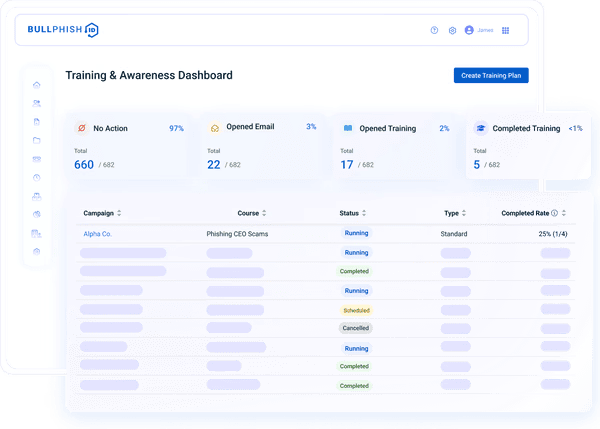
Each employee gets a short lesson every month: a video, a quiz or a one-page guide, a few minutes at their desk or on their phone. We send realistic phishing emails to your team throughout the year, and anyone who clicks gets a quick lesson on what they missed, straight away. You get a monthly report showing who completed their training, who clicked and who reported the email, so you can see the risk going down. We set it up, add and remove staff as they come and go, and send the reports, so there’s nothing for you to manage.
The training runs on BullPhish ID from Kaseya.
How it works
Phishing is one of the biggest cyber risks facing businesses. Do you have what it takes to stay safe?
A phishing email copies a supplier, a bank or Microsoft 365 well enough that a busy person clicks. One click can hand over a password, install ransomware or change the bank details on an invoice. Training is how your team learns to stop, check and report it.

Practice on safe phishing emails, not real ones
Our simulations look like the emails your team really gets: a parcel delivery, a shared document, an overdue invoice. Clicking one is safe and turns into a lesson; reporting one is recorded too, so you can see your team getting better at it.
Each person gets the training they need
The platform tracks each person’s results and gives them more practice where they slip, so the people most likely to click get the most help, and everyone else isn’t held up.
What’s included?
- A short security lesson for every employee, every month
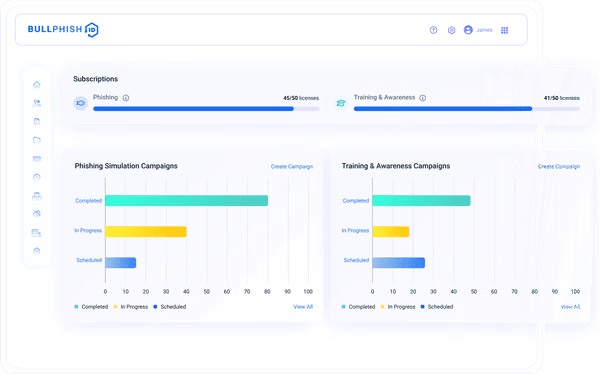
- Phishing simulations through the year, set up and run by us
- An instant lesson for anyone who clicks a simulation
- A report button so staff can flag suspicious emails
- A monthly report: training completed, who clicked, who reported
- A risk score for each person and for the business
- Evidence of training for Essential Eight, DISP, cyber insurance and audits
- Staff added and removed as your team changes
Frequently Asked Questions
1. What is cyber security awareness training?
Short, regular training that teaches your employees to recognise and report cyber threats: phishing emails, scam calls and texts, fake invoices, unsafe links and weak passwords. Most attacks on small and medium businesses start with a person, not a computer, so training your team is one of the cheapest ways to lower your risk.
2. What does the training cover?
Phishing and email scams, invoice and payment fraud, passwords and multi-factor authentication, safe use of Microsoft 365 and Teams, social media and phone scams, working from home and on the road, and using AI tools safely. New topics are added as new scams appear.
3. How often do employees need training?
A few minutes every month works better than one long session a year: people remember it, and it keeps up with new scams. Phishing simulations run through the year so the habit sticks.
4. What is a phishing simulation?
A safe, realistic fake phishing email we send to your team. If someone clicks, nothing bad happens; they get a short lesson on what to look for. You see who clicked and who reported it, so you know where the risk is.
5. Do we need awareness training for Essential Eight, DISP or cyber insurance?
DISP requires security awareness training for your staff, and most cyber insurers now ask whether you train your team and test them with phishing simulations. It also supports an Essential Eight program, and the monthly reports are your evidence. See DISP certification.
6. How much does it cost?
For our managed IT clients it’s $5 per user per month, added to our Microsoft 365 user protection package, and it’s included in our P1 Complete User and Device Security Bundle. On its own, it’s $9.95 per user per month plus a one-off implementation fee of $995. Prices exclude GST.
7. Do you only provide training to your managed IT clients?
No. Any business can have its team trained, whether we look after your IT or not, and it’s a good first step if you’re thinking about managed IT.
8. How long does it take to set up?
About a week. We load your staff from Microsoft 365, send a first phishing simulation to see where you’re starting from, and the monthly lessons begin straight after.